Another Summer Project: New UI for Room Booking System

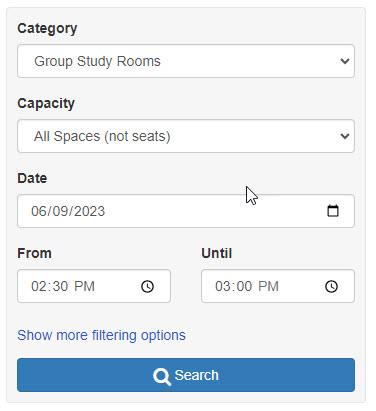
In January, we launched a new system, powered by Springshare’s LibCal, allowing students to book study rooms. This month, Springshare released a new interface option for the booking process that looks more like a flight or hotel reservation system. Instead of presenting users with a grid of all our rooms and their availability for reservations throughout the hours of the day, the new UI will offer a way for users to search for available rooms after checking off some criteria in a box:

  • category (study room or presentation room)
  • capacity (max of 3 or max of 8)
  • date
  • time (from and until)

We’re going to take a look at the interface to see about ways we can customize it (interface wording, error and confirmation messages, adding booking policy info, etc.) If I can find enough students this summer in our library, I might be able to run some usability tests on the UI as well.

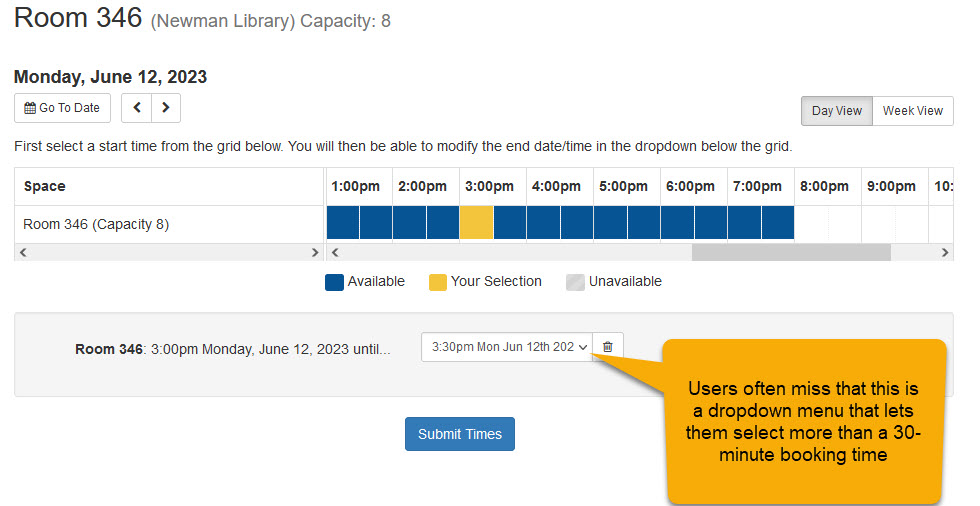
One problem I hope the new UI will solve is students not seeing how to set an end time when completing a reservation. By default, the initial selection of time on the grid is for 30 minutes. If you want to add additional 30-minute increments (up to a 2-hour max for the reservation), you have to notice the dropdown menu at the bottom of the page above the “Submit Times” button:

Users miss this fairly often and end up making multiple room reservations as a workaround (or asking us for help). The suggestion-based interface makes the start (“From”) and end (“Until”) readily apparent and adjustable:

Screenshot of suggestion-based interface showing search options including From and Until time choices

I’m excited by the new UI and hope that it passes muster after our summer testing of it.

Floor Plan Maps and Accessibility

Thanks to Nicollette Davis for her post on the WOC + Lib blog this week, “This Conference Could Have Been an Email: Counterstories, Accessibility, and Accomplices.” Reflecting on a return to conferences, Davis recounts a story from high school about the problems her mother faced finding an accessible entrance to an event in a high school theater. She then puts a fine point on the value of information that folks with disabilities need to plan their visits, including conferences:

When you register for the conference, you’re asked if you need accommodations such as a mobility scooter or a quiet space. However, there’s a lack of maps and information about travel, parking, distance, braille signage, etc. These are things that disabled folks have to consider well ahead of time. I heard from some attendees how uncomfortable they felt after having to navigate a new space with little insight.

Thinking today about my blog post two days ago where I mused about the value of mapping services in libraries, I realize the value of these maps is greater than I had previously imagined.

Call Numbers and Ebooks

Yesterday was another day that I got too busy to blog for #blogjune, so today will be another two-blog post-day.

At my library, our ebook collection has grown at a much faster rate than our print book collection. In the twenty-plus years that I’ve been here, we’ve gone from having a handful of ebooks to over 1,068,000. Our print collection has 277,000 books, which represents 21 percent of the total number of books we have. One thing that continues to annoy me (and others in libraries) is the limited metadata that comes with ebooks, which makes discovery of them harder. One piece of metadata is notably absent: a call number. This makes sense that call numbers are not displayed or often even in the record for ebooks, as there is no singular shelf location you need to get to to find the book; instead, there’s merely a link to the full text.

One downside of this situation is that a sometimes useful way to browse a collection, by an online display of sequential call numbers, is no longer useful if it only shows some of your books. Our discovery system, Primo VE, does have a browse by call number feature, but using it means you’ll only be seeing a fifth of the books we actually have. While it’s true to finding books by call number browse is not always the best way to find relevant works, if you’ve found one relevant work, the ones sitting nearby according to call number range are also very likely to be relevant (a concept that I recall from my library school days as “collocation”). I can see that some of our ebook records actually have a call number in the 050 field, but I don’t know why that information isn’t displayed in the record or used as part of the browse functionality. I’ll have to ask my colleagues who know more about these things.

How Much Do We Want to Pay for a Floor Map Service?

In my post a few days about, “Mapping Options for Librarians,” I put together quick list of features I’d like to see in one product (neither of the two leading solutions for libraries for creating and presenting library maps do all that I wish they could). I also made a claim that libraries may not want to spend too much on such mapping services. I’d like to unpack that a bit.

If I recall correctly, the first commercial product that came out to meet the specific needs of libraries offered to provide links from call numbers in catalog records to online maps that would show on a relevant floor map the shelf location for that item. That seemed like a neat trick at the time when libraries were as much about books on the shelves as they were about their online collections. Now, at least at our library, the balance of our collections has tilted far more toward online (there are three times as many ebooks in our collection as print ones). In the past, finding a book usually meant getting a call number and being confronted by the task of finding where on the shelves that book would be found. Now, it’s likely (but still debatable) that the bulk of our book usage by students at our college is with our ebook collection, not our print one (how to prove this point is beyond the scope of this post and, most likely, beyond my abilities).

Other locations in our library that were once highly used are now no longer as central for researchers: the print journal collection, the microfilm machines (there’s now only one and it’s kept in our Access Services offices), the photocopiers. We are seeing more than ever demand for individual and group study spaces, which is why we are moving to compact shelving to gain back some space for seating. The range of service points and specialized locations in the library has shrunk somewhat, making the need for highly detailed maps to help with wayfinding less important than the past.

Don’t get me wrong, though. Students at my library struggle just as hard to find the location of the study room they or their friends booked, and that service is just as popular as ever. And students still are challenged by the task of locating a print book; it’s just that now, that’s a task they are doing less often than in the past.

I’m happy that we found the LibCal service to be one that is priced right for us, even though the features offered by StackMap are mostly superior and better designed. Given our flat budget and rising prices for e-resources that we have to have, it’s hard for me to make an argument for paying as much for a mapping service with costs that equal what many of our database subscriptions cost or what our LibGuides subscription costs’ those are resources that are heavily used. I’m sure any maps we put online (and print out for signs, flyers, etc.) will indeed be useful and used, they just don’t rival other things we have to pay for in terms of importance to our users’ needs and habits.

Library Hours

I meant to write this post last night to keep up my daily posting regime for #blogjune, but after watching the new Donna Summer documentary, I was just spent. So I’ll try to write two posts today to make up for yesterday.

For a while now, I’ve been one of the cogs put into gear when the regular discussions come up of what hours we should have for this semester or that intersession period. As the person who updates our library hours page, my role lately has been to initiate the conversation about planning the hours. If it’s a fall semester, then I look at:

  • what we did last fall
  • what days the usual holidays fall on
  • the college’s academic calendar

Once the library administration and the heads of various service points agree on the draft of the hours, it’s been my job to:

  • add those upcoming hours to the library website (we use WordPress)
  • create signs for the library hours (I basically screenshot the hours page and print it out)
  • alert our campus IT so they can update the XML file that powers a “today’s hours” feature in the top right corner of the header of our website
  • update the hours in Google My Business and the Yelp and Bing equivalents
  • update the hours in LibCal, which we just started using this January for booking study rooms (the availability of rooms is pegged to when the circualation desk is open, as we check out room keys to students)

There’s one piece of the library hours machinery I’m not involved with: updating Alma so that loan periods and due dates can understand what days the library is open and when loans are considered due. I think that there is way that the LibCal API can transmit hours info to Alma. It would be great to link those systems up, as we are planning a move away from using a WordPress page with a manually updated table of hours and instead using LibCal fully to present a public page with our ours. We’d also use a LibCal widget on our home page to present those hours. It also seems likely that the decade old system of using an XML file to power the “today’s hours” feature in our header could be replaced with using the API from LibCal instead.

I always love finding ways to write data, words, etc. once and publish them automatically in multiple ways. Right now, we’re having to formally “write” the hours in different places. Cutting a few of those out of the picture would be a good thing.

Mapping Options for Librarians

In the spirit of #blogjune, I’m trying my darnedest to write a post every day this month, so the thoughts below about what I’d like to have in the way of mapping options for my library are more than a little dashed off. The service that would provide us detailed floor maps I’d like would:

  • be relatively inexpensive (I’ll explain why in a later post)
  • make the maps for us
  • let us use their online tools to update maps as often as like and in a manner that doesn’t require great technical expertise
  • let us embed map widgets in our website instead of making content live solely on the vendor’s domain
  • connect to the service to our physical holdings in our discovery layer to enable users to go from records to clear maps/directions to the shelf location
  • be as usable in mobile displays as in larger ones
  • allow for maps to be reconfigured for printing in a manner suitable to their use on signs, posters, flyers, etc.
  • offer QR codes for potential use with each version of a map we might need to generate (online or print)
  • make it easy to convert the perspective of a map (change the angle or go to an overhead view)
  • connect up with any room booking or event reservation service
  • offer options for those who rely on screen readers, Braille,

In a post I’ll work on later this week (maybe tomorrow), I’ll try explain why I’m not so sure it’s worth spending a fortune, though, for a mapping service.

The Return of the QR Code

Who would have guessed before the pandemic that QR codes would have become a thing? When they first hit the library world in the late 2000s and early 2010s, many of us found ourselves riding the Gartner hype cycle all too quickly: a quick shot up the peak of inflated expectations and a dizzying descent into the trough of disillusionment as users mostly ignored our cubist communications. As QR codes emerged again during the pandemic as part of a widespread effort to create contactless service experiences, we saw our new signs emblazoned with QR codes suddenly popular. Students would bypass speaking to us at the reference desk as they snapped photos of codes on signs we had there with instructions about how to print or how to look up your user name.

It wasn’t that long ago that some jokester made a website that, if my memory is correct, presented the user with a button that said something like “Should I use a QR code?” and that always yielded the answer of “No.” Now, I can’t imagine making a new sign for the library and not considering what kind of QR code might be useful to add to it. I don’t know when folks will grow out of the QR-code habit, but for now, I am going to consider it a standard part of my design toolkit for signs, flyers, handouts, etc.

Summer Projects

Two months ago, I outlined the projects I was working on for the spring that would have likely carried on into summer. Here’s a quick update on those.

Updating Floor Maps

It’s likely we’ll be using the LibCal custom mapping option in the fall for this. Price turned out to be the determining factor even though the main competitor had a much better feature set. We’ll have to wait until the 2023-2024 budget gets finalized this summer (our fiscal year ends on June 30) before we can proceed. I’m hoping to get double duty out of maps for new signage in the library, flyers for students needing to find study rooms or call number locations, etc.

Twitter on the Home Page

It’s pretty likely we’ll drop our Twitter display and replace it with a LibCal hours widget. We also display the day’s hours in the top right corner of the header (the display is keyed to an XML file on the web server the determines what message to display); we hope to take advantage of the LibCal API to power this same sort of display. One thing that we need to mull over is what counts as “news” from the library and how we should be sharing it. Twitter was the place where we posted brief, timely tidbits and the more formal library news blog is where we put more expansive announcements for larger projects. I think we’ll need to do some research with our users to get a better sense from them about what they expect “news” from the library to include.

Live Display of Available Computers on the Home Page

The campus IT folks now have the system working with new software to keep tabs on use of desktop computers, which means we can get the dashboard display on the home page working again. It’s a fair question, though, how important this info is to today’s students. When we first set this display up over a decade ago, a smaller percentage of students had their own laptops or tablets and were thus more reliant on us to provide a computer. I’m going to be doing some thinking (and research) about whether it makes sense to at least add in a display of how many laptops are available for borrowing, which means finding a way to tap into the Alma APIs for live data.

With spring classes having only ended last week, I’m still in that traditional excited and optimistic mode about all the projects that I hope to see to completion this summer. Typically, when August rolls around, I look at my project board and sigh at the reality of where we are. Still, I have good reason to believe that this summer will shape up to be one of my more productive ones.

Paperbacks and Content Collapse

Over the past few weeks, I stuck my nose down a rabbit hole (experimental paperbacks of the 1960s and 1970s) that gave me glimpses of a deeper warren (the history of the book) and that expanded my sense of an even grander and more complex topic (content collapse in media). Jeffrey Schnapp and Adam Michaels‘ book, The Electric Information Age Book: McLuhan/Agel/Fiore and the Experimental Paperback, explores how book packager Jerome Agel, graphic designer Quentin Fiore, and Marshall McLuhan kicked off a series of experiments in publishing using the paperback book format to explore and demonstrate the expanding, interconnected mass media universe of the 1960s. Their collaboration, The Medium Is the Massage, presented McLuhan’s ideas in a more accessible and modern format than his more academic works (e.g., Understanding Media).

As I read The Electric Information Age Book‘s analysis of The Medium Is the Massage, I realized I should pause my reading of the former book so I could dip into the latter one that Schnapp and Michaels discuss. I was happy to find a copy of The Medium Is the Massage in our library (getting a copy of The Electric Information Age Book, though, required interlibrary loan and led me to a pristine copy courtesy of Columbia University). Schnapp and Michaels’ book is also a catalog of other experimental paperbacks that Agel published with McCluhan, Carl Sagan, and many others. While learning about the very conscious efforts by Agel, Fiore, and McLuhan to embrace the elements of the modern, scrambled and interconnected media landscape and to break free of the traditional linear look and feel of printed books, it occurred to me that this history connects up with a current concern of mine about how container collapse is altering and undermining our users’ perceptions of traditional formats that libraries spotlight in so many ways (how we organize our collections, how we provide access to those collections, and how we teach our users to find items in our collections). I’m still not sure how as a UX librarian I should respond in my design work to the problem of container collapse, but now I know that this problem stretches back farther than the birth of the web and that the notion of what a book is and what is could be is in itself a complicated example of one kind of container collapse. I’m a little scared of what I imagine to be the scale of the next rabbit hole that is suggested in my journey: the history of the book (and the endless scholarship and debates about “what is a book?”)

Making Mistaken Assumptions about User Mental Models

As I’ve been doing various kinds of user research for over a decade and interacting with students in reference and classroom settings, I’ve been trying to keep my eyes peeled for changes in mental models our students have that might affect their use of the library website and library tools (databases, discovery layer, etc.) Reading the literature around the concept of “container collapse” over the past few years has made me think about the disconnect in the way libraries present to users access by format type (books, journals, newspapers, etc.) and what our students may actually know about those format types.

The more I read about “student success” initiatives on college campuses and efforts to make the campus experience more comprehensible to students and the more I pay attention to conversations on the subreddit for the college where I work, the more I see basic things we present on our college websites that we mistakenly assume students know about and will recognize by name as they browse or search our site. Here are some quick examples.

Directories

A common question I see from our students is, “How can I find the email address (or the phone number) of Professor So-and-So?” My initial instinct is to be shocked that that students don’t realize all that info is easily findable on the college’s directory. But if I take a moment and consider my age (I’m an early Gen-Xer), I remember that I grew up with nearly annual delivery of printed white pages and yellow pages to my home. That notion that there are canonical directories of contact information is one that has likely become less known, in part because phone books really aren’t much of a thing anymore.

Campus Offices

I’m not gonna lie here: I can’t tell you the origins of the word “bursar” or even properly without having to look it up, but I do happen to know it’s where you pay for stuff as a student. I can only imagine what students make of the term. The “registrar” is another office that uses an old-fashioned word that we assume students will be able to figure out. I’m excited by my college’s efforts to create a one-stop shop experience for students who don’t know where to turn for help and think it’s a useful step to address the lack of familiarity students have about who does what where on campus.

Campus Maps, Floor Plan Maps, and Directions

It doesn’t occur to every student that the campus website might include maps of all the building locations and directions to campus. As a commuter school, our needs in this area are probably more pressing than with a residential college where students are on campus 24/7. With respect to floor plans for a building, my mental model for that as a type of information may be stronger as I grew up in an era where any visit to a museum, zoo, or historical site included a chance to grab a paper map. While Google Maps and other mapping services have made some inroads in creating online floor plan maps, I wonder if my having been raised with paper versions makes the concept of such maps something I’m more likely to expect than younger generations are.

Final Thoughts

Clearly, as older container types for information and types of information fade from popular awareness, those of us who design websites need to be aware of these changes and have them reflected in our designs. Keeping up is a challenge, as there are informal ways to get some limited view of what’s changing, but increasingly I’ve been thinking that I need to more directed and purposeful to stay informed of what’s out and what’s on the horizon.