Keeping Up with AI as Epistemic Infrastructure

I was so happy to see that Lauren Pressley is blogging once again. I’ve been getting a lot out of her posts about AI, libraries, and the information ecosystem. Her framing of what libraries provide as “epistemic infrastructure” really hit a chord with me. As an ardent fan of RSS readers for close to twenty years, I have long relied on my hand picked sources to not only present me with new ideas in posts but also to offer me a rich set of links to related sources. Lauren’s posts on AI lately have led me to a number of sources I wouldn’t have found on my own. With this in mind, I want to spotlight four others whose blogs have also been essential to my evolving understanding of AI (in all its forms).

  • University of Winds from long-time (longest time?) library blogger Mita Williams has a weekly newsletter with notable links that have led me to all sorts of fascinating projects and ideas.
  • Information Flaneur from Hugh Rundle, who provides regular link recommendations on weeklyish(?) basis, also writes thoughtful posts of his own. He also interviewed Mita Williams in 2024 about her decades-long dedication to blogging about libraries.
  • Inkdroid from Ed Summers also offers weekly link posts as well as his own.
  • Second Breakfast from Audrey Watters builds on her highly regarded work analyzing ed tech (her book Teaching Machines is essential reading) to offer bi-weekly posts that link up higher ed’s current obsession with AI with the longer (and quixotic and misguided) historical effort to automate teaching and learning. Although the full posts require a subscription, it’s been totally worth it to me.

One last quick shout out goes not to a person but a service called Sill that does a decent job on a daily basis of looking at what is getting posted by the folks I follow on Mastodon and Bluesky and sends me an email digest of the most shared links. If you remember a similar but now defunct service called Nuzzel, this one is similar.

Outline for Undergraduate Course on Sociotechnical Analysis of AI

I’ve been rethinking the capstone course on AI that I last taught two years ago for undergraduate students in our information studies minor. In spring 2024, the class met on Tuesdays and Thursdays for 75-minute class session. This year, it’s being offered on Fridays with 3-hour class sessions. I’m having to pour the wine into larger bottles, thereby rethinking the entire flow of in-class activities and homework assignments. I’ve had to take a step back to get a high-level snapshot of the topics we discussed in 2024 to see how they can be grouped into a once-a-week cadence of classes.

Here’s where I am with what I did in 2024 and intend to mostly cover again (albeit in an updated fashion) for 2026:

  • Course intro 
    • syllabus review
    • document sharing in MS Office 
  • AI intro
    • history of AI 
    • kinds of AI 
    • how AI systems are built 
    • glossary assignment
    • gen AI
  • Educational aspects 
    • values of students, faculty, staff, administrators, etc. 
    • predictive analytics in higher ed ICTs
    • pros / cons of AI use in higher ed
    • kinds of use by students 
    • why we write and how we learn to write 
    • AI policies 
  • Information quality aspects  
    • training data quality
    • algorithmic bias 
    • misinformation, disinformation, malinformation 
    • AI transparency 
    • info ecosystem 
    • AI slop 
  • Economics and labor aspects 
    • job loss 
    • outsourcing of AI development labor 
    • costs of developing AI models 
    • costs to communities near data centers 
  • Legal aspects 
    • copyright and training data 
    • copyright status of inputs and outputs 
    • privacy 
    • libel 
  • Environmental aspects 
    • energy use and climate change 
    • water 
    • mineral extraction 

In thinking about the sociotechnical analysis that we’ll be doing in the course to understand AI, I’m still working out how I’ll bring to bear the model of “multi-level perspectives on transition” that F. W. Geels lays out in “The Dynamics of Transitions in Socio-Technical Systems: A Multi-Level Analysis of the Transition Pathway from Horse-Drawn Carriages to Automobiles (1860-1930).” (Technology Analysis & Strategic Management, vol. 17, no. 4, Dec. 2005, pp. 445–76. https://doi.org/10.1080/09537320500357319).

Who I Have Been Reading and Planning to Read

Much of what I have read on AI or want to read I learn about from specific people and blogs that I’ve learned to trust. I thought I’d give them a shout out here.

The Library Society of the World, a loose cohort of libraryland folks, has been together online since 2007. I’ve learned so much from them over the years; they have been absolutely essential to me since day one. You can join us in the LSW at Mokum.

As an inveterate reader of blogs, I’d like to share the ones that have consistently fed me ideas and reading recommendations on the subject of AI:

Since I agreed in September to teach the course again, I’ve been playing catch up with all the books that have come out since I last taught and trying to go back to ones I didn’t know about when I first taught the class. Here are the ones I’ve read this fall:

I’m currently half way through this book and am appreciating the author’s expertise as a linguist for her analysis of the impact of generative AI:

I’ll try to read a few more by the start of my class next January:

I’m also trying to read more about socio-technical analysis, particularly as it relates to ICTs, and have been focusing my efforts on journal articles and book chapters. I’ll see if I have enough for a roundup of sources in a future blog post.

Prepping to Teach a Course on Artificial Intelligence Again

Next spring, I’ll be teaching for the second time the capstone course for our library’s information studies minor. Listed in our course catalog as “Advanced Topics in Information Studies,” each instructor can focus that course on the topic of their choosing. I’ve decided I’d like to take another crack at teaching a socio-technical analysis of artificial intelligence. As you can see from my course website from spring 2024, my focus is not at all on how to use AI but rather on AI came to be and how various forces and organizations in society have been shaping its development.

It has been close to two years since I last taught this course. Although I have continued to pay close attention to developments in AI since then, in the past few months I have been making a concerted effort to shore up the foundations of what I know about the technology and about socio-technical analysis. I’ve also been talking everyone’s ear off if they happen to ask about my course, as I’m full of ideas and opinions lately that are still gelling and in need of being spoken so that I can figure out what I will do with them in my class. To save my friends, family, colleagues at work, and random strangers from consistently getting trapped in my current conversational enthusiasms (and may be looking for an exit from said conversations), I’m going to begin working things out here on my blog.

The inspiration to return to a practice of thinking by writing came from one of the books I’ve been reading in preparation for spring 2026 course: Who Wrote This? How AI and the Lure of Efficiency Threaten Human Writing by Naomi S. Baron. In a chapter that categorizes and details the reasons why humans feel compelled to write, she finds a rich history of writers who are “looking inward” and need to “bring into focus what they’re thinking,” such as:

  • Flannery O’Connor “I write because I don’t know what I think until I read what I say.”
  • George Bernard Shaw “I do not know what I think until I write it.”
  • William Faulkner “I never know what I think about something until I read what I’ve written on it.”
  • Joan Didion “I don’t know what I think until I write it down.”

The Enshittification of Livescribe

Stacks of Livescribe notebooks and two Livescribe pens sitting on an office desk.

My love for Livescribe is gone. After thirteen and a half years of filling notebooks with work-related jottings, to-do lists, etc., I now hate the product. Until this summer, I was using the original Echo pen and the nice bound notebooks. In the photo above, the shiny black Echo pen in the center and the notebooks behind it and on the right were the ones that loved using. The new Echo 2 pen and notebook, which I was forced by circumstance to switch over, are on the left side of the photo; I loathe this new set up. Had I been able to keep buying the original notebooks, I would have stuck with old Echo pen, but that style notebook is no longer available and the newer spiralbound notebooks won’t work with the old Echo pen, just the crappier Echo 2 pen.

If you’re considering buying an Echo 2 pen, here is what you are in for:

  • a pencap that refuses to stay on and, according to most users who’ve had theirs for while, is something that is bound to crack and be unusable (I’m also assuming that I’ll lose the pencap someday but will never be able to replace it because they don’t sell them separately as they did with pencaps for the original Echo pen)
  • notebook with lower quality paper and an annoying spiral binding that is awkward and makes it hard to write in the margins that are next to the binding
  • a new Bluetooth option for syncing your pen with the Livescribe app on your phone that is totally unable to connect a second time unless you delete the Bluetooth connection settings and set it up anew
  • a battery that last barely a day (the old one would hold a charge for much longer)

The combination is so much shoddier, unreliable, and unlovable.

I’ve got three more of those damned spiral notebooks to use up before I look for some other way of keeping handwritten notes in an attractive notebook that are digitized as I sync my pen and saved on my devices. It doesn’t seem like there are any other good alternatives, so maybe I’ll give up on the digital backup aspect and go with regular notebooks that are beautifully made and highly functional (I’ve been loving the Leuchtterm1917 notebook I got last year as an experiment for home/personal notes).

Done with Twitter

Since February 2007, I’ve been on Twitter, almost entirely as a means of engaging with fellow librarians and others in affiliated fields. Now, I’ve deleted all of my tweets (more on that in a second) and just now, my account, too. There’s no need to go on here about why I left: it’s for the same reasons that everyone else had ever since Elon Musk took over the company. I would have done it sooner but for my worry about the best way to delete my tweets. I had read about paid services that some folks were using to have their tweets deleted in bulk, but I really didn’t want to have to shell out my own money for a problem some asshole billionaire created for me.

As an alternative that I heard about on this blog post at the Verge, I used the free version of Redact to do the job for me. It worked like a charm. And now, as of September 24, 2023, I am done with Xitter (FKA Twitter).

Streamlining Records in Primo VE

As I have been thinking this past week about the bX Recommender service that displays related reading options on journal articles, I have become more deeply convinced that the records in Primo VE present too much information on the screen for most users. In usability tests I’ve conducted over the years, students often comment on these pages as being too busy or confusing and they usually struggle to zero in on the relevant information for the particular task I’ve asked them to demonstrate. It is important to note that some records are longer than others for unavoidable reasons:

What I’m beginning to wonder is if some of the information in Primo VE records could be hidden behind an accordion element. If the user wishes to, they can click on an icon next to that section to expand it and see the hidden text. I haven’t seen any Primo VE instances that include accordion elements, which leads me to believe that there is no way presently to do that using the Ex Libris Primo interface. If you want to design your own discovery layer and bring the Primo VE results in via an API, that might work. But I would love to see a way to do that within the Primo VE interface as something that could be configured in Alma.

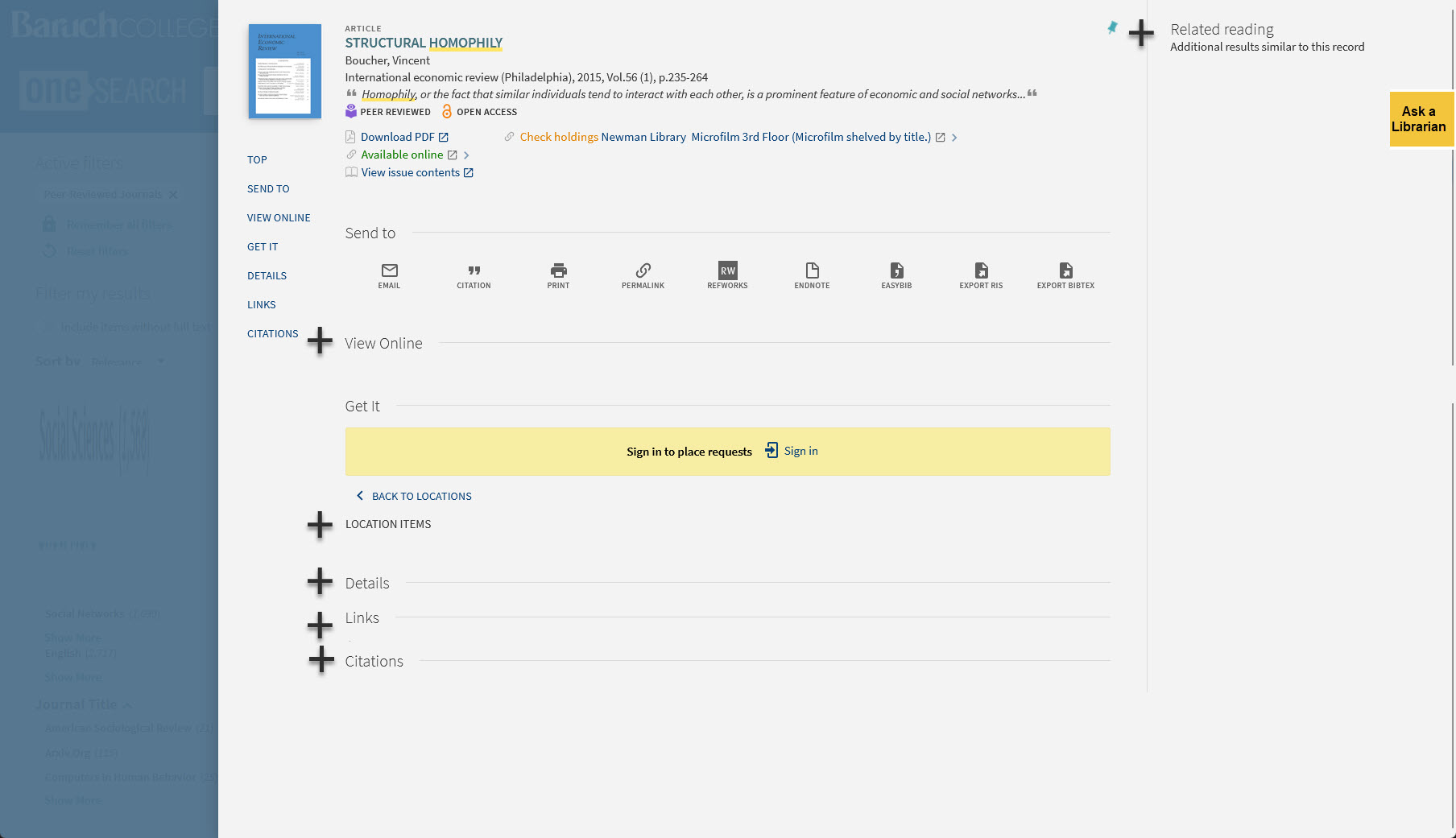
Here is roughly what I’m aiming at. Take this article record as an example. Below, I’ve added plus signs to show where you might have an expandable section in that record:

Sample article record with Plus Signs added next to the View Online, Location  Items, Details, Links, and Related Reading sections.

If you were to first encounter this record normally, you’d see all those sections collapsed like this:

Mockup of the record with sections collapsed

Maybe this is too much information being hidden. But I think it is a direction worth exploring.

Comparing bX Recommender Use to Other Primo VE Feature Use

I’m still thinking through ways to understand the relative usage of the bX Recommender service in our instance of Primo VE (something I have already written about here and here). I’m not much of an expert in Alma analytics, but I am thinking that perhaps the basic dashboard we’ve set up there that counts clicks on most of the key features of the Primo VE interface might yield an interesting set of statistics that give some context to the usage data for bX Recommender (roughly 2000 clicks a year on recommended items). I am thinking that if I can understand whether the bX Recommender links are getting clicked more or less than all the other things one can click on in an item record for an article, that might be useful.

Probably the most comparable things in a record that a user can click on would be those elements that have a “more like this” or “more of this” functionality, such as clicks on:

  • author names in the “Creator” section
  • subject headings
  • the citation trail features (sources that cite the source I’m looking at and sources that were cited in the source I’m looking at)
  • the “next page” link on the search results pages

Then, I think it would also be useful to see how the 2000 bX Recommender clicks stack up against clicks on the links for some of more useful basic functions in an item record:

  • facet filtering
  • clicks on a database link or the “view online” link that takes you down to where the database links are shown
  • show the record permalink
  • email the record
  • get a citation for the record
  • export to various citation management services/file formats
  • results sorting options (by relevance, by date-new, by date-old

Not sure how much this will help but it should deepen my understanding of what users are clicking on (and, more usefully, not clicking on).

Artists Addressing Familiar Issues

I took a day off from work yesterday to go to the Museum of Modern Art with my wife. We were eager to see the exhibit “Signals: How Video Transformed the World,” which is due to close on July 8. With one exception (Nam June Paik), I hadn’t heard of any of the artists or encountered their work before. What I was familiar with though where common themes that many of these video works addressed: the birth and expansion of the information society, the excitement of early ICTs as harbingers of a new global society, the broken promises of techno-utopians, the use of ICTs by surveillance states around the world, the creative embrace of ICTs by activists looking for ways to evade the gaze of authoritarian regimes, and so much more. These are issues that come up a lot in the courses I teach in my library’s information studies minor. My own understanding of these concerns comes primarily from reading (books, articles, blog posts, etc.), so it was especially exciting for me to encounter these ideas in works of art that used video in some way.

Stephen Francoeur taking a photo of an artwork with a desk, computer, multiple TV monitors, and closed circuit cameras.
Me taking a photo of Julia Scher’s “Information America.”

In other parts of the museum, I also ran into other works that, as an information professional, resonated with me:

Stephen Francoeur standing in front of oversized reproduction of a red Google Map pin
Google Maps Pin by Jens Eilstrup Rasmussen
Detail from a wall-sized infographic on all the technology that goes into an Amazon Echo
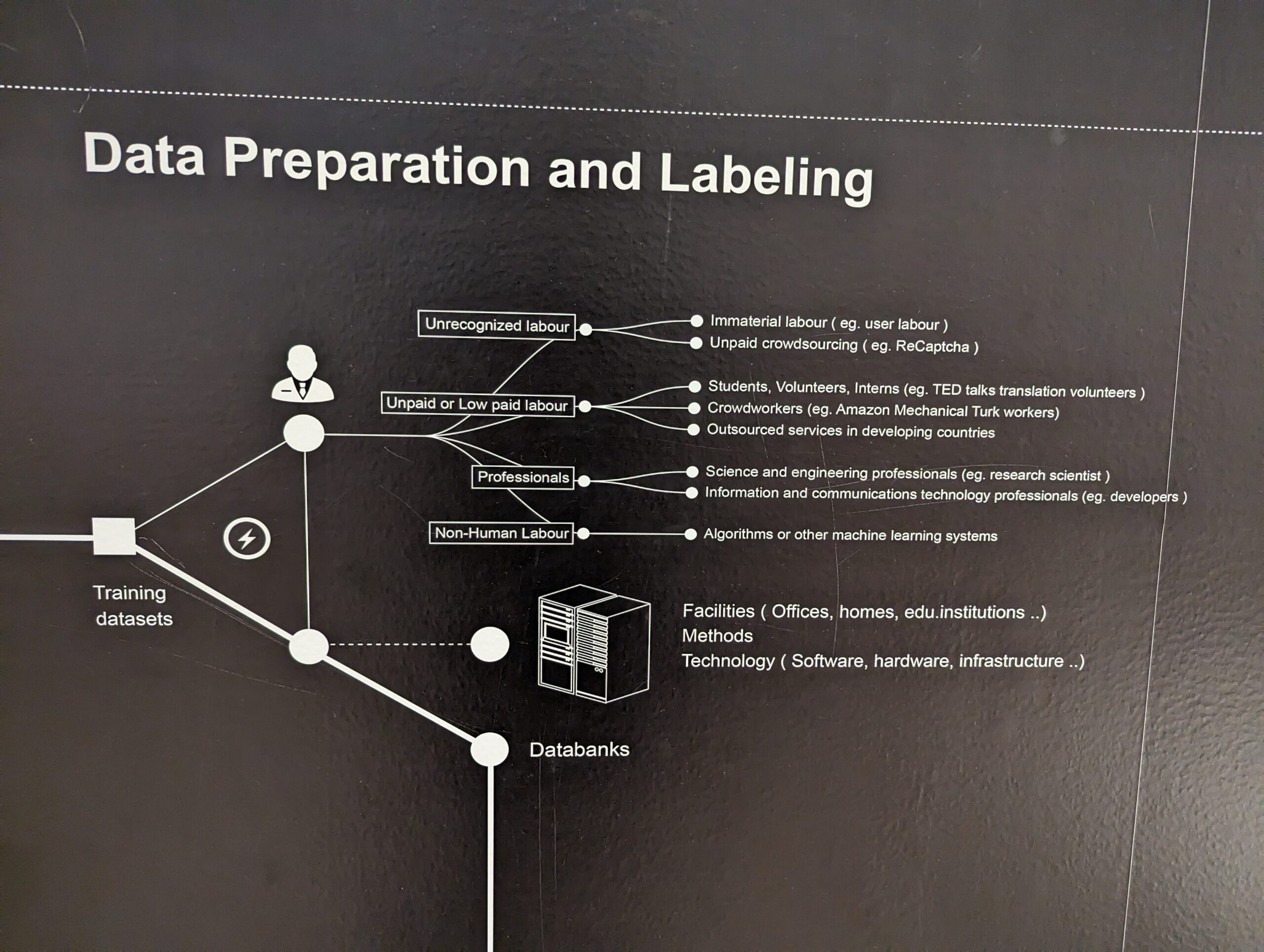
One part of a wall-sized infographic, “Anatomy of an AI System” by Kate Crawford and Vladan Joler (also available on a standalone website)
Photo of a linoleum cut image by Elizabeth Catlett showing Phillis Wheatley seated while writing
“In Phillis Wheatley I Proved Intellectual Equality in the Midst of Slavery” by Elizabeth Catlett

Hard and Soft Paywalls

I don’t know how I got this far as a librarian without realizing until last week that there is a term for those paywalls that you see mostly on magazine and newspaper websites where you are allowed a set number of articles per month for free: a soft paywall. In reference interactions, I had been relying on using a laborious explanation to refer to that thing that the user was asking for assistance with (specifically, how they could get around the paywall to view the article that was so tantalizing close at hand). Now I’ve got a nice piece of jargon to use that may or may not need explaining to the user depending on the context.

Over the years, I’ve seen steady growth in reference questions where the user has found a paywalled article and wants to know if we can help them with it. The most common publications that generate this problem for us are the Atlantic, the Financial Times, the Economist, and the Wall Street Journal. Sometimes, I can just get the article for them and send it because we have in a database (even those tricky ones that aren’t in the regular periodical but are web-only articles). Sometimes, though, it’s web-only content that we don’t have access to in a database at all (the Atlantic is the worst for this). If I’m lucky, I haven’t hit the soft paywall yet on my own computer, and can get the article and send it to the user.

I’ve heard of librarians using the 12ft Ladder service to get around the paywall but haven’t used it in actual reference interaction yet. On their website, the folks behind it explain how it works this way:

The idea is pretty simple, news sites want Google to index their content so it shows up in search results. So they don’t show a paywall to the Google crawler. We benefit from this because the Google crawler will cache a copy of the site every time it crawls it.

All we do is show you that cached, unpaywalled version of the page.

Clever.