
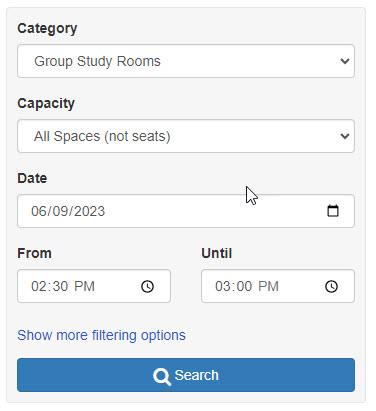
In January, we launched a new system, powered by Springshare’s LibCal, allowing students to book study rooms. This month, Springshare released a new interface option for the booking process that looks more like a flight or hotel reservation system. Instead of presenting users with a grid of all our rooms and their availability for reservations throughout the hours of the day, the new UI will offer a way for users to search for available rooms after checking off some criteria in a box:
- category (study room or presentation room)
- capacity (max of 3 or max of 8)
- date
- time (from and until)
We’re going to take a look at the interface to see about ways we can customize it (interface wording, error and confirmation messages, adding booking policy info, etc.) If I can find enough students this summer in our library, I might be able to run some usability tests on the UI as well.
One problem I hope the new UI will solve is students not seeing how to set an end time when completing a reservation. By default, the initial selection of time on the grid is for 30 minutes. If you want to add additional 30-minute increments (up to a 2-hour max for the reservation), you have to notice the dropdown menu at the bottom of the page above the “Submit Times” button:
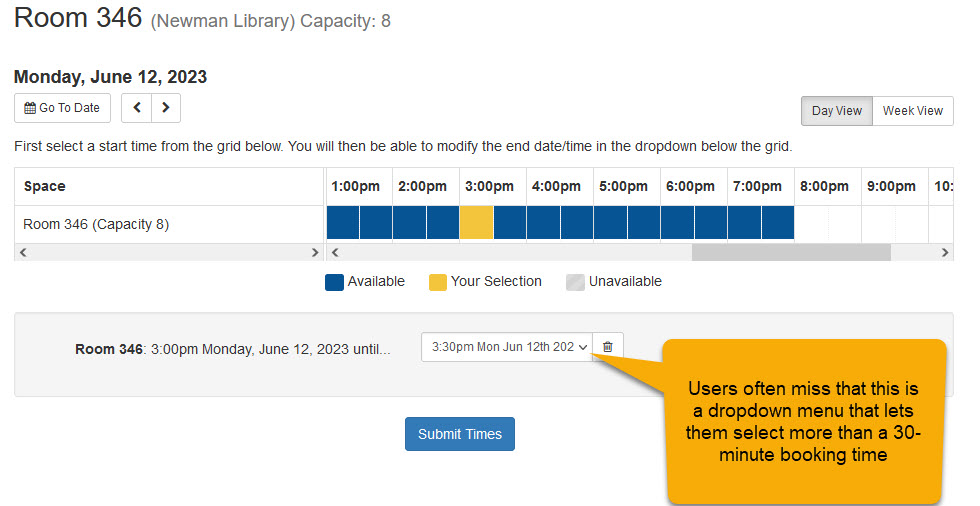
Users miss this fairly often and end up making multiple room reservations as a workaround (or asking us for help). The suggestion-based interface makes the start (“From”) and end (“Until”) readily apparent and adjustable:
I’m excited by the new UI and hope that it passes muster after our summer testing of it.